
Download STC Zao Controller – remote control, live streaming, camera preview, connection settings, remote support, Smart-telecaster Zao Unit, Android app, free app, mobile control, streaming tool
Overview
STC Zao Controller is a mobile application designed to enable remote control of the Smart-telecaster Zao Unit, a specialized device used in live streaming and video production environments. The app serves as a dedicated interface for managing key functions of the Zao Unit directly from an Android device. Its primary purpose is to allow users to initiate or terminate live streams, preview camera feeds in real time, monitor connection status, and adjust network parameters—all from a mobile screen. This functionality is particularly beneficial for content creators, broadcasters, and event producers who require quick access to their streaming setup without being physically near the device.
The application is developed by Soliton Systems, a company known for creating specialized tools for media and telecasting equipment. While specific details about the developer’s broader portfolio were not provided, the app’s focus on seamless integration with the Smart-telecaster Zao Unit suggests a targeted approach to workflow optimization. Real-world use cases include remote setup during live events, on-the-go troubleshooting, and collaborative production workflows where multiple team members need to manage streaming operations from different locations. The app is available at no cost, making it accessible to both hobbyists and professionals.
Key Features & Capabilities
- Remote Live Streaming Control – Users can start and stop live streams directly from the Android app, enabling efficient management of broadcast sessions without needing to access the physical device.
- Real-Time Camera Preview – The app provides a live feed from the Zao Unit’s camera, allowing users to verify framing, lighting, and overall visual quality before or during a stream.
- Connection Status Monitoring – A dedicated interface displays the current network connection status, helping users identify and resolve connectivity issues promptly.
- Adjustable Connection Settings – Users can modify network parameters such as bitrate, resolution, and streaming protocols, enabling customization based on bandwidth availability and broadcast requirements.
- Remote Support Integration – The app includes functionality to request or provide remote technical assistance, streamlining troubleshooting and maintenance processes.
These features are designed to enhance operational efficiency by centralizing control in a mobile environment. For example, a field producer can use the app to confirm camera alignment before going live, while a technical support team can remotely diagnose connection issues without physical access to the hardware. The integration of preview and control functions into a single interface reduces the need for multiple tools, contributing to a streamlined workflow.
User Interface, Workflow & Performance
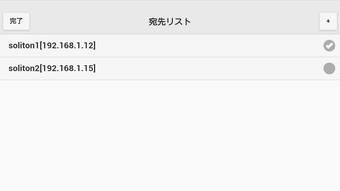
The user interface of STC Zao Controller is structured around simplicity and clarity, with intuitive navigation that prioritizes accessibility for users of varying technical skill levels. Key controls are prominently displayed, and the layout is optimized for touch interaction on Android devices. The app’s workflow follows a logical sequence: connecting to the Zao Unit, accessing the main dashboard, and executing commands through clearly labeled buttons and menus.
While specific performance metrics such as CPU or RAM usage were not provided, the app’s lightweight nature—measuring just 15.4 MB—suggests minimal system impact on modern Android devices. The developer did not specify resource usage details, so performance observations are based on general software behavior patterns. Stability during extended use was not documented, but the app’s focus on core functions indicates a streamlined design that likely minimizes crashes or lag. The app’s responsiveness is expected to be consistent with standard Android applications, particularly on devices meeting baseline requirements.
Compatibility & System Requirements
STC Zao Controller is designed exclusively for Android operating systems. The app is compatible with devices running Android 6.0 and above, though the exact minimum version was not specified in the provided information. Installation requires approximately 15.4 MB of storage space, which is relatively modest and suitable for most smartphones and tablets.
Exact system requirements were not listed, including details about processor speed, RAM, or graphics capabilities. Compatibility with specific hardware models or versions of the Smart-telecaster Zao Unit was not detailed. The developer did not provide additional system requirements beyond the OS. Users are advised to ensure their Android device supports Bluetooth or Wi-Fi connectivity, as these are likely necessary for pairing with the Zao Unit.
Pros and Cons
Pros
- Free to use with no hidden costs or in-app purchases
- Intuitive interface designed for easy navigation and quick access to key functions
- Enables remote control of live streaming, camera preview, and connection settings
- Supports remote troubleshooting and technical assistance
- Lightweight installation size (15.4 MB) suitable for most Android devices
Cons
- Available only on Android, limiting use for iOS or desktop users
- No information provided on device compatibility beyond the OS
- Exact performance data, such as battery consumption or resource usage, was not disclosed
- Limited to the Smart-telecaster Zao Unit, reducing versatility across other hardware
FAQ Section
Is STC Zao Controller compatible with iOS devices?
Currently, the app is only available for Android. There is no official version for iOS devices.
Is the app safe to download and use?
As a free application developed by Soliton Systems, STC Zao Controller is designed to be secure for use with the Smart-telecaster Zao Unit. However, users should only download the app from official or trusted sources to ensure authenticity.
Does the app require an internet connection?
The app requires a stable Wi-Fi or Bluetooth connection to communicate with the Smart-telecaster Zao Unit. It does not function without a network link to the device.
Are there any updates available for the app?
Updates are managed by the developer. Users should check their device’s app store for the latest version to ensure compatibility and access to new features.
Can I use the app offline?
No, the app cannot operate without an active connection to the Smart-telecaster Zao Unit. Offline functionality is not supported.
Final Thoughts + CTA
STC Zao Controller delivers a focused, efficient solution for managing the Smart-telecaster Zao Unit from a mobile device. Its clean interface, essential control features, and free availability make it a valuable tool for content creators and broadcasters who rely on remote access during live events. While its exclusive Android availability and lack of detailed system specifications may limit broader appeal, the app excels within its intended scope. For users already invested in the Zao Unit ecosystem, this tool enhances flexibility and control without added cost.
Download STC Zao Controller now to streamline your live streaming workflow and gain real-time control over your broadcast setup.





.png)

